An XPS file is a document that contains fixed page layout information written in the XPS page description language. The file defines a document’s layout, appearance, and printing information. XPS files are similar to .PDF files, but saved in Microsoft’s proprietary XPS format.
How to open an XPS file
Windows users can open XPS files in Microsoft XPS Viewer. In Windows 11 and later versions of Windows 10, you must manually install XPS Viewer by going to Settings → Apps → Optional features → Add an optional feature and searching for XPS Viewer.
XPS and OpenXPS open like any other document — paths, text, gradients, images and clipping, with the embedded fonts read directly. Everything else follows: separations, ink coverage, preflight, the object tree, RIP export
Object inspector –
Select anything on the page and see what it is: type, position, size in points and millimetres, declared ink, and the transform applied to it
For text, the actual typeface, its size, and whether it is embedded
Shift-click to select several; the inspector reports what they have in common
Continuous scrolling –
Pages now run on from one to the next, with the sidebar following as you scroll
One page at a time remains available in Settings ▸ General for examining a single page closely
Fixed –
Objects drawn under a transform were listed in the wrong place on the page, and some could not be selected at all. Embedded images were missing from the object list entirely
Text selections covered a word or two rather than the whole block
Comparison now follows the page you are viewing, zooms with the toolbar, and says why when a file cannot be read
Hiding objects works in PDF files, not only PostScript, and is instant regardless of document size
Files can now reach VectorView from anywhere, and leave it as a PDF.
Opening files from other apps –
Open With in the Files app now offers VectorView Share a file from Mail, Safari or anywhere else and send it straight here AirDrop a drawing from a Mac or another device and it opens on arrival
Create PDF –
New in the + menu: build a PDF from your photos, CorelDRAW drawings or PostScript files Pick several files and they become the pages of one document, in the order you choose them CorelDRAW pages are written as vectors, so they stay sharp at any size and print properly
Printing –
Print any drawing straight from the preview CorelDRAW files print as vectors rather than as an enlarged picture Page size, orientation and range come from the usual print panel
New Folder –
Create a folder from the + menu, without going into the toolbar
Ember Clay –
A new Pro theme: warm orange on a dark, clay-toned page
Large PostScript files –
EPS files up to several hundred megabytes now open, depending on your device — previously anything over 50 MB was refused All EPS files open faster When a file genuinely can’t be opened, the app now says why: too large, unreadable, or using features it can’t interpret. Those explanations appear in your own language.
Also fixed –
PDF thumbnails were drawn upside down Themes now reach the header bars, the Settings and upgrade sheets, and the New Folder dialog Changing the theme no longer blanks the screen on iPad
Rasterise a document the way a platesetter will image it — separated 1-bit plates, 8-bit greyscale, or composite CMYK, at up to 3600 dpi Output size is estimated before you commit, so a 2400 dpi composite is a choice rather than a surprise
Halftone magnifier
Click anywhere on the page to see the actual dots at plate resolution View all plates together or one at a time, with ink coverage for each Needs no export first — the file on screen is enough
Imposition
Saddle-stitch booklets and n-up sheets, with the page pairing worked out for you Add other files to the booklet — the open document stays first A diagram shows how each sheet is laid out, where the fold falls, and which pages sit where
Export presets
Outlined PDF — every character becomes a path, so nothing can be substituted anywhere downstream Press-ready, Proof, and PDF/X-1a with an embedded output intent
Printer’s marks
Crop marks, registration targets and an optional slug line Previewed on the canvas before exporting, including the larger sheet they need
Review notes
Approved, Rejected, Revise and Seen stamps, and arrows you can re-point by dragging either end
Also
One tool active at a time — choosing a tool puts the last one away Select is the default tool: click any object on the page to identify it Tools and Prepress menus, and a toolbar grouped to match
Eyedropper. Hover to read any colour in the drawing, click to lock it. Where the file states a colour you get the exact CMYK or spot ink the designer set; elsewhere you get the colour as it will image. The readout says which, and copies all three notations at once.
Cropper. Copy an area. Drag a rectangle anywhere on the canvas and it goes to the clipboard as an image — drawn fresh at full resolution, so a crop taken while zoomed out is still sharp.
Both live in the new Tools menu, alongside Measure and Drawing Scale.
Object inspector –
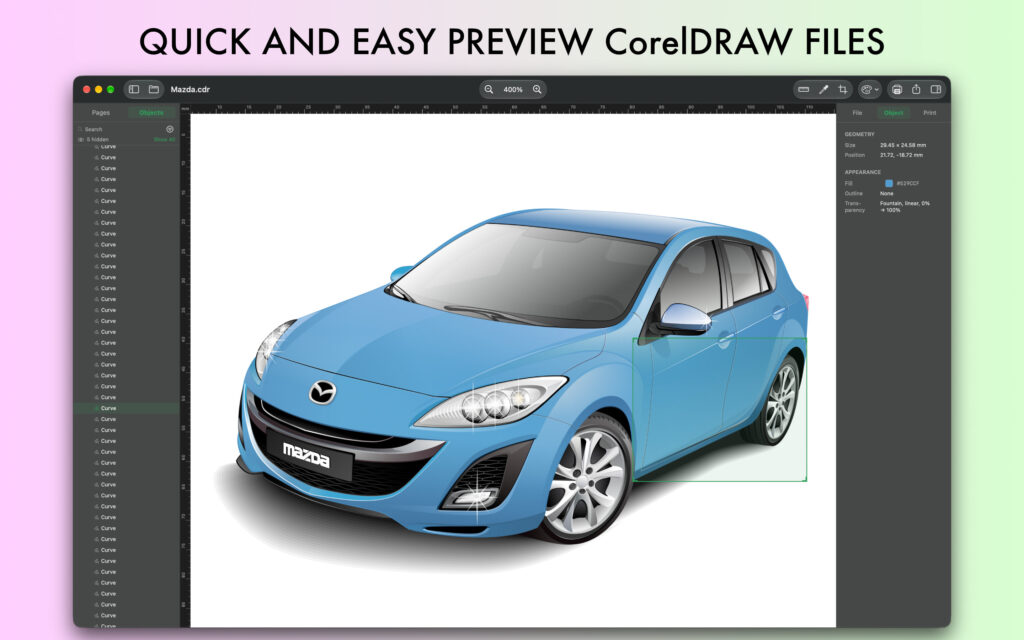
A new Object tab in the inspector. Select anything and see what the file says about it — size and position, fill with the exact CMYK or spot ink the designer set, outline colour and width, dashes, transparency. For text: the font, size, colour and content.
Click to select. Click any object on the page to select it — no tool needed. It highlights on the canvas and its row opens in the object list, and vice versa.
Printing –
Print (⌘P), from the File menu or the toolbar. Vector output, so it stays sharp at any size, with page ranges and scaling from the standard macOS dialog. What you see is what prints — hidden objects stay hidden.
Export –
DXF export. Send a drawing to AutoCAD or any CAD application as editable geometry: paths, layers, colours and live text. Placed images are left out and gradients flattened — DXF has no equivalent for either — and the export tells you what it left behind.
EPS export. PostScript for print workflows and sign cutting: paths, CMYK, outlined text, embedded images and gradients. Placed photographs travel with the file rather than being referenced.
Export a single page by right-clicking its thumbnail.
Exporting no longer blocks the app. The panel closes as soon as it knows what to write, and the drawing’s own window shows progress. Large exports leave the app usable throughout.
Settings –
Bleed amount, low-resolution warning threshold, and an option to scroll to the object you select in the object list.
Also –
Page thumbnails scale with the sidebar instead of staying one size Icons on the zoom menu items More space between the sidebar and inspector tabs Page bounds and bleed outlines now sit under the rulers rather than over them Text objects show their size and position in the inspector Hiding an object no longer resets the zoom
CorelDRAW files now render with new engine — the same one CDRViewer uses on the Mac — and look the same on both. Zoom stays sharp at any level, multi-page documents open properly, Cyrillic and CJK text appears, and drawings with large embedded photographs no longer lose parts of the page. You can also choose the canvas colour behind drawings that carry no background of their own.
File info now reports the CorelDRAW version, page and object counts, and which fonts a drawing needs — flagging any your device does not have.
Plus: themes reach every corner of the app, importing a folder no longer locks it up, and PDF thumbnails are the right way up
“EPSViewer Pro – Postscript and PDF Converter” is updated to version 4.0.6
-Review notes-
Add notes, sticky notes, callouts and freehand marks straight onto the artwork Notes resize themselves to fit what you type, or drag a corner to size them yourself Everything is saved automatically and is still there when you reopen the file — your original is never modified Export with Include notes: in a PDF they stay live, so whoever receives it can read and reply in Preview or Acrobat
-Compare revisions-
Open two versions of a job and see what changed Side by side, overlay, or changes only Also compares fonts, spot colours, page count and declared size — the changes a pixel comparison cannot show
-See what a file is made of-
A new Objects tab in the inspector lists every mark on the page — fills, strokes, text, images and gradients — in the order they were drawn, with size and ink Select an object to outline it on the page, or click the page to find it in the list Hide any object, or isolate one to see what sits underneath. The page is genuinely redrawn without it, not covered over Export with hidden objects left out — a PDF export stays vector
-Copy artwork out-
Select any objects and copy them straight to the clipboard, cropped to what you picked Pastes into Illustrator, Affinity or InDesign as editable vector, and into Mail or Keynote as an image No more opening a design application just to pull one logo out of an EPS
-Better colour and measurement-
The eyedropper now also reports what an object declares, alongside what it renders — so a black that was built in RGB is obvious Measuring snaps to object corners and edges. Hold Option for a free position
-New check: stray geometry-
Flags artwork extending far beyond the page — a stray point or a clip region left at its default size. It never shows on screen, but it distorts the bounding box every layout application reads
-Tidier-
Tools and Prepress menus, instead of one long View menu Eyedropper and Open buttons in the toolbar
-Also-
Pages and Notes are now tabs in one sidebar Tools act on the front tab only
Object list. A new sidebar showing the drawing’s layers, groups and objects. Search it, filter by type, and click any row to outline that object on the canvas.
Hide and isolate. Turn off layers or individual shapes to see what’s underneath. Export follows what you see, with the option to put hidden objects back.
-Print-
Separations preview. View the drawing one plate at a time — process inks plus a plate for each spot colour. A preview from the drawing’s own colours, not a RIP.
Print Check. A second inspector tab: what the drawing is built in, with warnings for RGB in a CMYK job, heavy ink coverage, and rich blacks.
Image resolution. Every placed picture with its effective resolution, flagged below 300 dpi. Extract them all to a folder in one step.
Page bounds and bleed. The printed page marked on the canvas, so artwork parked outside it is obvious.
-Measuring-
Rulers and a measurement tool, in millimetres, centimetres, inches or points.
Drawing scale. Tell CDRViewer that 50 mm on the page is 5 m in life, and measurements read in real-world sizes. Remembered per file.
-New Files-
CorelDRAW templates (.cdrt) now open..
-Faster-
Opening a file is quicker, especially a large one. A drawing was being read from disk several times over; now it’s read once.
-Also-
Font list now shows the sizes each typeface is used at
Page size reports the page CorelDRAW states, alongside the drawing’s actual extent
Open File button in the toolbar; the sidebar can be dragged wider.
We are always here to hear your requests, contact us in any case you need support for CDRViewer!
“EPSViewer Pro – Postscript and PDF Converter” is updated to version 4.0.5
Color separations
See the plates your job will actually print on. Every process and spot separation, rendered the way a RIP separates them, with per-plate ink coverage
Spot colors appear as their own plates under their own names — a Pantone, an HKS or a varnish is shown as the extra plate it really is, not folded into CMYK
Toggle plates on and off, isolate any single plate, and view in colour or greyscale
Spot inks are shown in their measured colour rather than a generic swatch
Colour eyedropper
Sample any point for CMYK, RGB and hex, with a colour swatch
Values are read from a true CMYK rendering, so the ink percentages are the ones that will print — not a guess reverse-engineered from screen pixels
Point, 3 × 3 or 5 × 5 averaging
Click to lock a reading and ⌘C to copy the values
Font and image audit
Fonts are checked against what the file actually carries, not what a conversion produced. A file naming a font it doesn’t embed is now caught, where previously the conversion’s own substitute made it look correct
Embedded, subset, standard or missing status for every font
Effective image resolution — a 300 dpi photo placed at 200% is a 150 dpi photo, and that’s the number reported
Rich black detection — flags artwork whose blacks separate onto all four plates, which usually means it was built in RGB
Spot colors declared but not measured are now cross-checked and reported
Now works for PDF and Illustrator files too
Ink coverage, total ink coverage, artwork checks and document information now apply to PDF and AI, not just PostScript
PDF artwork is checked against its trim box, and artwork extending past trim is correctly reported as bleed rather than as clipping
Every check is made per page, so pages of differing size are each judged on their own terms
Faster
Tools now act on the front tab only, instead of every open document
Documents open substantially faster. Analysis now runs for the page you’re looking at instead of every page at once — on a long document that’s a fraction of the previous work
Artwork checking can be switched off entirely in Settings for very heavy files
VectorView now has a real iPad interface: a sidebar with your folders, Recents, Favourites, iCloud and Trash, a folder trail in the toolbar, and previews that use the whole screen.
Files also open differently everywhere — in place of the browser, with a Back button and the usual edge-swipe, and a left-right swipe to move through the rest of the list.
And it’s faster: importing no longer locks the screen, opening a folder no longer stutters, and previews are remembered between visits.
*** WHAT MAKES IT SPECIAL ***
Unlike generic file viewers, VectorView includes professional rendering engines specifically for designers and print professionals. We’ve spent months optimizing the rendering pipeline to deliver the best quality on iOS.
*** FREE TO TRY ***
Start with 3 file imports per day. Upgrade to Pro anytime for unlimited access and export features.
*** PERFECT TIMING ***
Whether you’re reviewing client files at a coffee shop, checking print files before a deadline, or accessing your creative work while traveling, VectorView is ready when you are.
We use cookies on our website to give you the most relevant experience by remembering your preferences and repeat visits. By clicking “Accept”, you consent to the use of ALL the cookies.
This website uses cookies to improve your experience while you navigate through the website. Out of these, the cookies that are categorized as necessary are stored on your browser as they are essential for the working of basic functionalities of the website. We also use third-party cookies that help us analyze and understand how you use this website. These cookies will be stored in your browser only with your consent. You also have the option to opt-out of these cookies. But opting out of some of these cookies may affect your browsing experience.
Necessary cookies are absolutely essential for the website to function properly. These cookies ensure basic functionalities and security features of the website, anonymously.
Cookie
Duration
Description
cookielawinfo-checkbox-analytics
11 months
This cookie is set by GDPR Cookie Consent plugin. The cookie is used to store the user consent for the cookies in the category "Analytics".
cookielawinfo-checkbox-functional
11 months
The cookie is set by GDPR cookie consent to record the user consent for the cookies in the category "Functional".
cookielawinfo-checkbox-necessary
11 months
This cookie is set by GDPR Cookie Consent plugin. The cookies is used to store the user consent for the cookies in the category "Necessary".
cookielawinfo-checkbox-others
11 months
This cookie is set by GDPR Cookie Consent plugin. The cookie is used to store the user consent for the cookies in the category "Other.
cookielawinfo-checkbox-performance
11 months
This cookie is set by GDPR Cookie Consent plugin. The cookie is used to store the user consent for the cookies in the category "Performance".
viewed_cookie_policy
11 months
The cookie is set by the GDPR Cookie Consent plugin and is used to store whether or not user has consented to the use of cookies. It does not store any personal data.
Functional cookies help to perform certain functionalities like sharing the content of the website on social media platforms, collect feedbacks, and other third-party features.
Performance cookies are used to understand and analyze the key performance indexes of the website which helps in delivering a better user experience for the visitors.
Analytical cookies are used to understand how visitors interact with the website. These cookies help provide information on metrics the number of visitors, bounce rate, traffic source, etc.
Advertisement cookies are used to provide visitors with relevant ads and marketing campaigns. These cookies track visitors across websites and collect information to provide customized ads.